Convert GIF to WEBP for Smaller File Sizes
Reduce GIF file sizes by up to 35% by converting to WEBP. Free, fast, and private — right in your browser with no signup needed.
Drag & drop images here
or · WEBP, JPG, JFIF, PNG, HEIC, AVIF, TIFF, GIF, BMP
No file size limit · 100% free · No signup required
GIF to WEBP: what the conversion actually does
Animated WEBP does everything an animated GIF does and stores it far more efficiently — typically 60-80% smaller — while lifting GIF's 256-colour ceiling to full 24-bit colour with real alpha transparency. For anything you are putting on a web page, WEBP is strictly the better container. This converter runs in your browser and saves the first frame of each GIF as a full-colour still WEBP — ideal for thumbnails, stills and GIF logos.
How to convert GIF to WEBP
- 1Drop your .gif files above.
- 2Set quality — 75-85 is usually indistinguishable from the GIF and much smaller.
- 3Convert and download.
GIF's limits, in plain terms
A three-second screen recording that is 4 MB as a GIF is routinely under 800 KB as an animated WEBP, with better colour.
- 256 colours per frame. Photographic content dithers into visible speckle.
- One-bit transparency: a pixel is either fully opaque or fully clear, which is why GIF logos have jagged fringes.
- LZW compression, designed in 1987, which is far weaker than anything modern.
- No way to trade quality for size — a long GIF is simply a big GIF.
Where animated WEBP works
| Destination | Animated WEBP? |
|---|---|
| Your own website | Yes — every current browser |
| WordPress media library | Yes, since 5.8 |
| Slack, Discord | Yes |
| Email newsletters | No — keep GIF |
| Most social feeds | Converted server-side anyway; upload video if you can |
If the GIF is a screen recording, consider video
For anything longer than a few seconds, an MP4 or WEBM will beat both GIF and WEBP by a wide margin, because video codecs encode the difference between frames rather than the frames themselves. Animated WEBP is the right answer when you need something that behaves like an image — auto-playing, looping, no controls — without the size of a GIF.
Privacy
Nothing is uploaded. The file is decoded and re-encoded by your own browser using the Canvas API, so the image never leaves your device and there is no queue, no size cap and no account.
Three mistakes to avoid
Using WEBP in an email campaign
Several mail clients show nothing at all. Animated GIF is still the only safe choice in email.
Expecting a still GIF to shrink dramatically
A single-frame GIF of flat colour is already small. The big wins are on animations and photographic content.
Converting without checking the loop
Check that the animation still loops the way you intended before you publish it.
Keep reading
Why Choose Our Converter?
Built for speed, privacy, and simplicity. No compromises.
Batch Conversion
Convert hundreds of WEBP images to JPG at once. No file limits.
Quality Control
Fine-tune JPEG quality from 10% to 100% with a simple slider.
ZIP Download
Download all converted files in a single ZIP archive instantly.
100% Private
All processing happens in your browser. No files are uploaded to any server.
Works Everywhere
Mobile, tablet, or desktop — convert images on any device, any browser.
Lightning Fast
Client-side processing means instant conversions with zero waiting.
How It Works
Three simple steps to convert your images.
Upload
Drag & drop your WEBP files or click to browse.
Adjust
Set quality, resize, and other options.
Convert & Download
Click convert and download your JPGs instantly.
Frequently Asked Questions
Everything you need to know about image conversion.
Gear we recommend for this workflow
As an Amazon Associate we earn from qualifying purchases. Affiliate disclosure.

Elgato Stream Deck MK.2 Studio Controller, 15 Macro Keys | Trigger actions in OBS, Twitch, YouTube and more, Visual feedback, Hundreds of plugins, Works with Mac and PC
Best for one-touch shortcuts while creating
$119.99
Check price on Amazon
Logitech Brio Ultra 4K HD Webcam for Streaming and Meetings - Black | Ultra HD with glass lens, auto light correction, wide view, works with Windows Hello, certified for Teams, Zoom, Google Meet
Best for high-quality video calls and streaming
$169.99
Check price on Amazon
MAYBESTA Wireless Mini Microphone for iPhone, Android Phone - 2 Pack Lavalier Lapel Mic for Audio Video Recording - Clip on Content Creator Microphones for YouTube Tiktok Podcast Vlogging
Best for clear voiceovers and streaming
$19.99
Check price on Amazon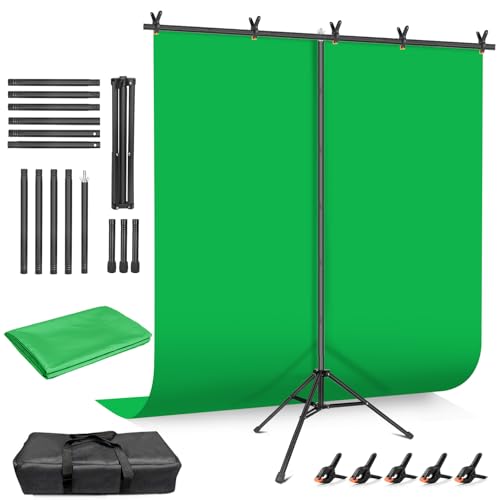
Hemmotop Wider Green Screen Backdrop with Stand, 8x7.5ft Background Kit | Solid Chroma Green, Polyester Cloth, Perfect for Streaming Video Calls Zoom Studio, Ideal for Content Creators, Photography
Best for background replacement in video
$39.98
Check price on AmazonPrices as of Oct 15, 2026, 4:40 AM UTC. Product prices and availability are accurate as of the date/time indicated and are subject to change. Any price and availability information displayed on Amazon.com at the time of purchase will apply to the purchase of this product.
Recommended Tools
Other great tools to complement your image workflow.
Other Free Converters
Free Image Tools
See every utility on the free tools hub.