Passport & ID Photo Format Guide (2026)
Applying for a passport, visa, or government ID online? Most portals have very specific image requirements — wrong format, dimensions, or file size and your application gets rejected. This guide covers exact specs for major countries and how to convert your photo to match.
Common Government Photo Requirements
| Country / Document | Dimensions | File Size | Format | DPI |
|---|---|---|---|---|
| US Passport | 600 × 600 px | 240 KB – 10 MB | JPG only | 300 |
| US Visa (DS-160) | 600 × 600 px | Under 240 KB | JPG only | 300 |
| UK Passport | 600 × 750 px | 50 KB – 10 MB | JPG only | — |
| Schengen Visa | 413 × 531 px | Under 500 KB | JPG | 300 |
| Indian Passport | 350 × 350 px | 10 KB – 300 KB | JPG only | — |
| Canadian Passport | 420 × 540 px | Under 5 MB | JPG, PNG | — |
| Australian Passport | 600 × 800 px | Under 5 MB | JPG | — |
| Chinese Visa | 354 × 472 px | 40 KB – 120 KB | JPG only | 300 |
Key pattern: Almost every government portal requires JPG (JPEG) format. No HEIC, WEBP, PNG (usually), or any other format. If your photo is in the wrong format, convert it first.
Step-by-Step: Prepare Your Photo
- Take or scan your photo following your country's composition guidelines (centered face, neutral expression, plain background)
- Convert to JPG if it's in HEIC, PNG, or any other format. Use our HEIC to JPG converter for iPhone photos or PNG to JPG converter for other formats.
- Resize to exact dimensions — Use our converter's resize feature to set the exact width and height required.
- Compress to meet file size limits — Enable the "Max file size" option and enter the limit (e.g., 240 KB for US visa).
- Verify — Check the output file's properties to confirm dimensions and file size before uploading.
US Passport Photo (Detailed)
The US Department of State has very specific requirements:
- Digital format: JPEG (.jpg) only
- Size: 600 × 600 pixels (square)
- File size: Between 240 KB and 10 MB
- Color: Full color (no black & white)
- Background: Plain white or off-white
- Recency: Taken within the last 6 months
- Composition: Full face, front view, eyes open, mouth closed
Common rejection reasons: Wrong file format (HEIC from iPhone), file too small (<240 KB after over-compression), photo not square, shadows on face or background.
US Visa DS-160 Photo
The DS-160 visa application has a stricter file size limit:
- Maximum 240 KB — This is the tricky part. A typical phone photo is 3-10 MB.
- Exactly 600 × 600 pixels
- JPG format only
How to hit 240 KB: Upload your photo to our converter, set output to JPG, resize to 600×600, and enable "Max file size" at 240 KB. The converter automatically adjusts quality to meet the target.
Driver's License & State ID Photos
If you're uploading a photo for a state ID renewal or Real ID application:
- Most DMV portals accept JPG and PNG
- File size limits vary by state (typically 1-5 MB)
- Dimensions vary — check your state's specific requirements
- HEIC is never accepted — always convert from HEIC first
Professional Headshot Conversions
Applying for jobs, professional licenses, or academic programs? Common requirements:
| Use Case | Typical Requirements |
|---|---|
| LinkedIn profile | 400×400 px, JPG/PNG, under 8 MB |
| Job application (ATS) | JPG only, under 2 MB, various dimensions |
| Medical license | JPG, passport-style, specific dimensions per state |
| University admission | JPG, 150×200 to 600×600 px, under 500 KB |
Troubleshooting Upload Rejections
- "File type not supported" — Your photo is in HEIC, WEBP, or PNG. Convert to JPG. See our complete fix guide.
- "File too large" — The portal has a KB limit. Compress the photo to fit with compress to 50 KB or compress to 100 KB, or type the exact limit into the compress to any KB size tool.
- "File too small" — Your image may be under-compressed. Try quality 85-90% without the file size limiter.
- "Wrong dimensions" — Use our resize feature to set exact pixel dimensions.
- "Image is blurry" — You may have over-compressed. Start with a higher-resolution source photo.
Frequently Asked Questions
Can I use my iPhone for a passport photo?
Yes! iPhone cameras are more than capable. Take the photo with good lighting against a white wall, then convert from HEIC to JPG and resize to 600×600.
Why do government sites only accept JPG?
JPG is universally supported, has predictable file sizes, and has been the standard for decades. Government IT systems were built around it and rarely update format support.
Can I take a photo of my printed passport photo?
You can, but it's not recommended — you'll get lower quality, potential glare, and color shifts. It's better to use the original digital photo and convert it to the right format.
Gear we recommend for this workflow
As an Amazon Associate we earn from qualifying purchases. Affiliate disclosure.

JANYUN 4 Style Envelope Addressing Guide Stencil, Templates Ruler Guide
Best for measuring passport photos correctly
$5.95
Check price on Amazon
Staples Poster Board, 22x28 Inch, White, 10/Carton, for School
Best budget passport photo backdrop
$12.56
Check price on Amazon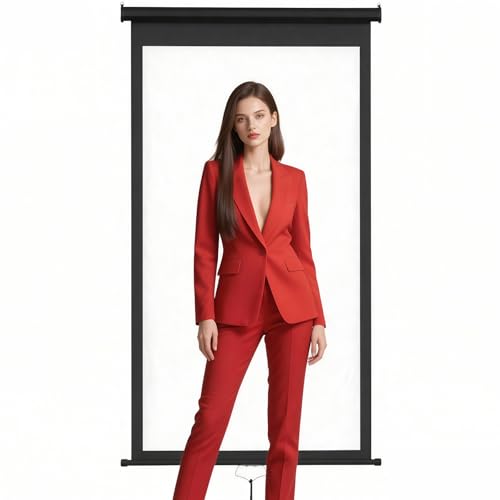
Retractable White Photography Backdrop 36"x59", Portable Roll-Up, Pull-Down Background, Auto-Lock Backdrop Screen for Passport Photo, Product Photography, Headshots, Video Studio
Best pure-white backdrop for ID photos
$56.87
Check price on Amazon
Liene M100 4x6'' Photo Printer, Phone Printer 100 Sheets & 3 Cartridges, Full-Color Photo, Portable Instant Photo Printer for iPhone Android, Thermal Dye Sublimation, Wi-Fi Picture Printer 100 Papers
Best dedicated passport photo printer
$159.99
Check price on AmazonPrices as of Oct 15, 2026, 4:40 AM UTC. Product prices and availability are accurate as of the date/time indicated and are subject to change. Any price and availability information displayed on Amazon.com at the time of purchase will apply to the purchase of this product.
Image Optimization Tips
Get weekly tips on image formats, compression, and web performance.
No spam, unsubscribe anytime. We respect your privacy.