Aspect Ratio Calculator
Work out new width and height values that keep your image perfectly in proportion — no stretching, no squashing.
Updated May 2026 · Free · Works entirely in your browser
How to use this calculator
Type the width and height your image has today into the two top boxes. Then type the width you want in the "new width" box — the height fills itself in automatically. Use those two numbers in the resize settings of our converter and the picture will keep its shape exactly.
Why proportions matter
Marketplaces such as Etsy, Amazon and eBay reject or awkwardly crop pictures that do not match their expected shape. Forcing a wide photo into a square field stretches faces and product edges, which reads as low quality even when the file itself is sharp. Cropping to the right ratio first, then resizing, always looks better than letting a platform do it for you.
Gear we recommend for this workflow
As an Amazon Associate we earn from qualifying purchases. Affiliate disclosure.

BenQ PD2706U Mac-Ready Monitor 27” 4K UHD, 90W USB-C, 99% sRGB, 95% P3, DeltaE ≤3, DisplayHDR 400, IPS, AQCOLOR, Factory-Calibrated, Uniformity, HotKey Puck, Ergonomic, DisplayPort, KVM, USB Hub
Best for accurate color when editing photos
$399.99
Check price on Amazon
MAYBESTA Wireless Mini Microphone for iPhone, Android Phone - Lavalier Lapel Mic for Audio Video Recording - Clip on Content Creator Microphones for YouTube Tiktok Podcast Vlogging
Best for clear voiceovers and streaming
$19.99
Check price on Amazon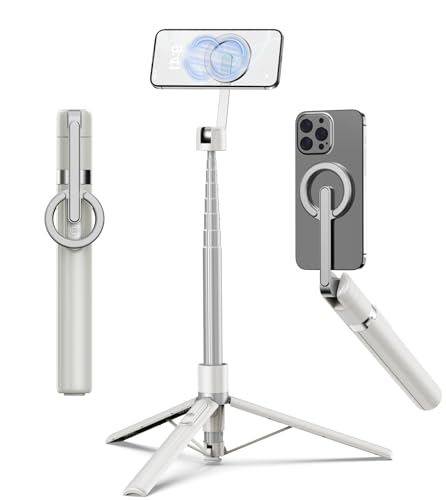
TONEOF 68" Magnetic Aluminum Phone Tripod Selfie Stick for iPhone & Android | Rechargeable Remote,360° Rotatable Foldable Cell Phone Stand Holder with Metal Ring,Travel Tripod for Magsafe (Beige Gray)
Best for stable iPhone photos and video
$23.99
Check price on Amazon
Logitech MX Creative Console 9 Customizable Keys - Graphite | Control Dial, for graphic design, Zoom and Spotify, includes 3-Month Adobe Cloud Membership, Stream Deck Accessories
Best for design shortcuts and multimedia work
$169.99
Check price on AmazonPrices as of Oct 22, 2026, 4:41 AM UTC. Product prices and availability are accurate as of the date/time indicated and are subject to change. Any price and availability information displayed on Amazon.com at the time of purchase will apply to the purchase of this product.
Frequently Asked Questions
Everything you need to know about image conversion.