Social Media Image Sizes Guide 2026 (Every Platform)
Posting the wrong image size on social media leads to awkward cropping, blurry photos, and lower engagement. This guide covers the exact pixel dimensions for every major platform in 2026 — bookmark this as your go-to cheat sheet.
Instagram Image Sizes
| Placement | Dimensions (px) | Aspect Ratio | Max File Size |
|---|---|---|---|
| Square Post | 1080 × 1080 | 1:1 | 30 MB |
| Portrait Post | 1080 × 1350 | 4:5 | 30 MB |
| Landscape Post | 1080 × 566 | 1.91:1 | 30 MB |
| Story / Reels | 1080 × 1920 | 9:16 | 30 MB |
| Profile Photo | 320 × 320 | 1:1 | — |
| Carousel | 1080 × 1080 | 1:1 | 30 MB per image |
Pro tip: Instagram compresses images heavily on upload. Upload at exactly these dimensions in JPG format at 95% quality for the sharpest result. Use our Instagram resizer to fit a photo to these sizes without cropping, or split an image into a profile grid.
Facebook Image Sizes
| Placement | Dimensions (px) | Aspect Ratio |
|---|---|---|
| Feed Post (Link) | 1200 × 630 | 1.91:1 |
| Feed Post (Photo) | 1200 × 1200 | 1:1 |
| Cover Photo | 820 × 312 | 2.63:1 |
| Profile Photo | 170 × 170 | 1:1 |
| Story | 1080 × 1920 | 9:16 |
| Event Cover | 1200 × 628 | 1.91:1 |
| Group Cover | 1640 × 856 | 1.91:1 |
Facebook supports JPG, PNG, and WEBP. For photos, JPG at 85% quality gives the best size-to-quality ratio. PNG is better for graphics with text or logos.
X (Twitter) Image Sizes
| Placement | Dimensions (px) | Aspect Ratio |
|---|---|---|
| In-Stream Photo | 1600 × 900 | 16:9 |
| Profile Photo | 400 × 400 | 1:1 |
| Header/Banner | 1500 × 500 | 3:1 |
| Card Image | 800 × 418 | 1.91:1 |
X compresses images aggressively. For the sharpest photos, upload PNG under 5 MB (X won't compress PNGs as much). For general photos, JPG at 90%+ quality works well.
LinkedIn Image Sizes
| Placement | Dimensions (px) | Aspect Ratio |
|---|---|---|
| Feed Post | 1200 × 627 | 1.91:1 |
| Profile Photo | 400 × 400 | 1:1 |
| Banner Image | 1584 × 396 | 4:1 |
| Company Logo | 300 × 300 | 1:1 |
| Article Cover | 1200 × 644 | 1.86:1 |
TikTok Image Sizes
| Placement | Dimensions (px) | Aspect Ratio |
|---|---|---|
| Video Thumbnail | 1080 × 1920 | 9:16 |
| Profile Photo | 200 × 200 | 1:1 |
| Photo Post (Carousel) | 1080 × 1920 | 9:16 |
YouTube Image Sizes
| Placement | Dimensions (px) | Aspect Ratio |
|---|---|---|
| Thumbnail | 1280 × 720 | 16:9 |
| Channel Banner | 2560 × 1440 | 16:9 |
| Profile Photo | 800 × 800 | 1:1 |
| Community Post | 1200 × 675 | 16:9 |
YouTube thumbnails must be under 2 MB. If your thumbnail is too large, use our converter to compress it to JPG at 85% quality — you'll easily get under the limit while keeping it sharp.
Pinterest Image Sizes
| Placement | Dimensions (px) | Aspect Ratio |
|---|---|---|
| Standard Pin | 1000 × 1500 | 2:3 |
| Idea Pin | 1080 × 1920 | 9:16 |
| Profile Photo | 165 × 165 | 1:1 |
| Board Cover | 222 × 150 | — |
Pinterest favors tall images (2:3 ratio). Pins in this ratio get more engagement and appear larger in the feed. Use JPG or PNG format.
Best Format for Social Media
Most platforms accept JPG, PNG, and WEBP. Here's which to use:
- Photos → JPG at 85-95% quality (smallest file, great quality)
- Graphics with text → PNG (sharp text, no compression artifacts)
- Logos/icons → PNG with transparency
- Maximum quality → PNG under 5 MB (least platform compression)
Need to convert between formats? Use our free PNG to JPG, JPG to WEBP, or WEBP to PNG converters.
Frequently Asked Questions
What happens if I upload the wrong size?
The platform will auto-crop or scale your image, often cutting off important content. Always resize to the recommended dimensions before uploading for full control over how your image appears.
Want a landscape or portrait photo on a square feed without cropping it? Add a border to the image to pad it out to the shape you need. Posting your own photography? You can add a watermark to the photo before it goes up.
Should I use WEBP for social media?
Most platforms now accept WEBP, but JPG remains the safest choice for maximum compatibility. WEBP is ideal if you want smaller file sizes for faster uploading.
Why do my images look blurry after uploading?
Social platforms compress images on upload. To minimize quality loss: upload at exactly the recommended dimensions, use JPG at 95%+ quality (or PNG under 5 MB), and avoid uploading images that have already been compressed multiple times.
Gear we recommend for this workflow
As an Amazon Associate we earn from qualifying purchases. Affiliate disclosure.

UBeesize 14'' LED Foldable Ring Light with 62'' Tripod Stand, Selfie Ring Light for Video Recording, Live Streaming, TikTok & YouTube, Compatible with iPhone & Android (Black)
Best for even, flattering lighting
$37.92
Check price on Amazon
MAYBESTA Wireless Mini Microphone for iPhone, Android Phone - 2 Pack Lavalier Lapel Mic for Audio Video Recording - Clip on Content Creator Microphones for YouTube Tiktok Podcast Vlogging
Best for clear voiceovers and streaming
$19.99
Check price on Amazon
Logitech Brio Ultra 4K HD Webcam for Streaming and Meetings - Black
Best for high-quality video calls and streaming
$169.99
Check price on Amazon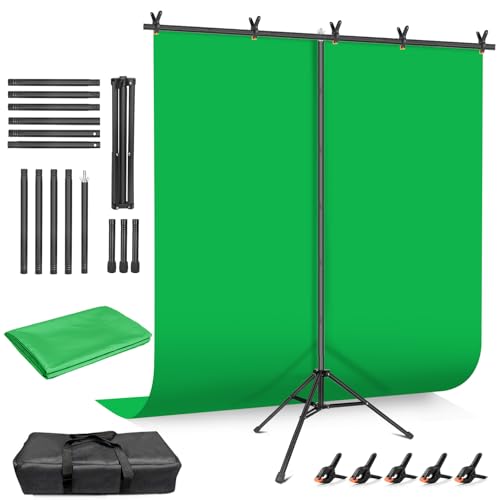
Hemmotop Wider Green Screen Backdrop with Stand, 8x7.5ft Background Kit
Best for background replacement in video
$39.98
Check price on AmazonPrices as of Oct 14, 2026, 4:43 AM UTC. Product prices and availability are accurate as of the date/time indicated and are subject to change. Any price and availability information displayed on Amazon.com at the time of purchase will apply to the purchase of this product.
Image Optimization Tips
Get weekly tips on image formats, compression, and web performance.
No spam, unsubscribe anytime. We respect your privacy.