How to Convert Images for Etsy, eBay & Amazon Listings
Product photos make or break online sales. But every marketplace has different image requirements — wrong format, wrong size, and your listing gets rejected or looks terrible. This guide covers exact specs for every major platform and how to convert your photos to match.
Why Image Format Matters for E-Commerce
The right image format affects three critical things:
- Upload acceptance — Each platform has strict format and size limits. HEIC, WEBP, and TIFF are rejected by most marketplaces.
- Loading speed — Faster-loading images mean customers see your products sooner and bounce less. This directly impacts search ranking within the marketplace.
- Image quality — Compression artifacts, wrong dimensions, and blurry zoom make products look cheap. High-quality photos increase conversion rates by 30-40%.
Platform Requirements Cheat Sheet
| Platform | Formats | Min Dimensions | Recommended | Max File Size | Background |
|---|---|---|---|---|---|
| Amazon | JPG, PNG, TIFF, GIF | 1000 × 1000 | 2000 × 2000 | 10 MB | Pure white (#FFFFFF) |
| Etsy | JPG, PNG, GIF | 2000 × 2000 | 2700 × 2025 | — | Any (lifestyle preferred) |
| eBay | JPG, PNG | 500 × 500 | 1600 × 1600 | 12 MB | White or clean |
| Shopify | JPG, PNG, GIF, WEBP | — | 2048 × 2048 | 20 MB | Varies by theme |
| Walmart | JPG, PNG | 1000 × 1000 | 2000 × 2000 | 5 MB | Pure white |
| Poshmark | JPG, PNG | 880 × 1100 | 1200 × 1500 | — | Clean, well-lit |
| Mercari | JPG, PNG | 640 × 640 | 1080 × 1080 | — | Any |
One Photo Set for Amazon, eBay and Walmart at the Same Time
Short answer: export each photo once as a square 2000 × 2000 px JPG in sRGB, product on pure white (255, 255, 255) filling about 85% of the frame, with no text, borders or watermarks, and keep every file under 5 MB. That single master meets the strictest rule of each marketplace, so you upload the same files everywhere.
| Rule | Amazon | eBay | Walmart | Use for all three |
|---|---|---|---|---|
| Minimum size | 1,000 px longest side for zoom (2,000+ recommended) | 500 px longest side | Square, 1:1 recommended | 2000 × 2000 px |
| Format | JPEG, PNG, TIFF, non-animated GIF | JPG accepted | JPEG, PNG, BMP | JPG |
| Background | Pure white, RGB 255, 255, 255 | Clean; no added borders | White primary image, no shadows | Pure white |
| Product fill | 85% or more of the frame | — | Product is the sole focus | About 85% |
| Text, logos, watermarks | Not allowed on the main image | No added text or watermarks of any type | Watermarks are a common rejection | None |
| File size | — | — | Guides quote a 5 MB or 10 MB cap | Under 5 MB |
Sources: eBay picture policy (eBay Help); Seller Labs, “Amazon Product Image Requirements 2026”; Isopeel, “Walmart Marketplace Image Requirements 2026”. Marketplaces change these rules, so check the seller help pages before a large upload.
How to make the master set
- Shoot or edit the product on a white sweep, then set the background to exactly 255, 255, 255 (Amazon checks this on the main image).
- Crop to a 1:1 square with the product filling about 85% of the frame.
- Resize to 2000 × 2000 px and export as JPG at 90–95% quality in sRGB. Convert HEIC, WEBP or TIFF originals with the HEIC to JPG, WEBP to JPG or TIFF to JPG converters.
- Check each file is under 5 MB. A 2000 × 2000 JPG at 90% usually is; if one is not, step quality down to 85%.
- Keep text, badges and watermarks for secondary images on platforms that allow them, never the main image.
- Name files by SKU and angle (for example
SKU123-main.jpg,SKU123-side.jpg) so the same set uploads to each marketplace in order.
Amazon Product Image Requirements (Detailed)
Amazon is the strictest marketplace. Their requirements for the main listing image:
- Format: JPG (JPEG) strongly preferred. PNG accepted but larger files.
- Dimensions: Minimum 1000px on longest side (for zoom). Recommended 2000×2000 for best zoom quality.
- Background: Pure white (RGB 255, 255, 255). Amazon will reject images with off-white or colored backgrounds.
- Product fill: Product must occupy at least 85% of the image frame.
- No watermarks, borders, or text on the main image.
Tip: If your photos are in HEIC (from iPhone) or WEBP, convert them to JPG first. Use our HEIC to JPG converter or WEBP to JPG converter.
Etsy Listing Photo Tips
Etsy is more flexible than Amazon but still has best practices:
- First photo matters most — It's the thumbnail in search results. Make it clear and eye-catching.
- Use all 10 photo slots — Listings with more photos get higher placement in Etsy search.
- Recommended size: 2700 × 2025 pixels (4:3 ratio) for optimal display.
- File format: JPG for photos, PNG for graphics or items with transparency.
- Lifestyle shots — Etsy buyers prefer seeing products in context (styled on a table, being worn, etc.).
eBay Photo Optimization
eBay prioritizes listings with high-quality photos in search results:
- Use 1600×1600 minimum — This enables eBay's zoom feature, which increases buyer confidence.
- Max 12 free photos per listing — Use them all.
- JPG format recommended — Smaller files upload faster and display sooner.
- Avoid stock photos — eBay deprioritizes listings that use the same photos as other sellers.
Converting Your Product Photos
iPhone Photos (HEIC → JPG)
If you photograph products with your iPhone, they're saved as HEIC — a format most marketplaces reject. Batch convert them with our HEIC to JPG converter. Set quality to 90-95% for crisp product details.
Scanner/Camera Photos (TIFF → JPG)
Professional product photographers often deliver TIFF files. These are too large for marketplace uploads (often 30-50 MB each). Convert with our TIFF to JPG converter at 90% quality.
Web-Downloaded Images (WEBP → JPG)
If you've downloaded reference images or supplier photos in WEBP format, convert them to JPG with our WEBP to JPG converter.
Batch Processing Multiple Products
Listing 50+ products? Upload all your images at once, convert to JPG, and download as a ZIP. Use our renaming feature to organize by SKU or product name. Read our batch conversion guide for the full workflow.
Two edits come up again and again on product photos. For your own shop, ads or a cut-out on a coloured banner, the make background transparent tool removes a plain backdrop and saves a PNG you can place on any colour. Note that Amazon's main image needs a pure white background, not a transparent one. For lifestyle shots you share elsewhere, you can add a watermark to your photos in a batch, but leave it off marketplace listing images: Amazon's main image rules, for example, do not allow watermarks or text.
Pro Tips for E-Commerce Images
- Shoot large, compress later — Always photograph at the highest resolution your camera allows. You can always scale down but never up.
- Consistent dimensions — Use the same aspect ratio for all listing photos. Inconsistent sizes look unprofessional in your shop.
- Optimize for mobile — 70%+ of marketplace browsing happens on phones. Test how your images look on a small screen.
- Keep originals — Always save your full-resolution originals. Marketplace uploads are the compressed copies.
- White balance — Ensure accurate colors. A product that looks different from the listing photo leads to returns and bad reviews.
Frequently Asked Questions
How do I format product images to meet Amazon, eBay and Walmart requirements at the same time?
Export one master per photo as a square 2000 × 2000 px JPG in sRGB, product on a pure white (255, 255, 255) background filling about 85% of the frame, no text, borders or watermarks, and under 5 MB. That clears Amazon's 1,000 px zoom minimum and white-background rule, eBay's 500 px minimum and its no-border, no-text, no-watermark rule, and Walmart's white primary image in a 1:1 square.
What is the best image size for Amazon, eBay and Walmart?
2000 × 2000 pixels. It is above Amazon's 1,000 px zoom minimum and eBay's 500 px minimum, and it is the square format Walmart displays, so one export works on all three.
Can I use WEBP images on Amazon?
No. Amazon accepts JPEG, PNG, TIFF and non-animated GIF, not WEBP. Convert to JPG with the WEBP to JPG converter on this site before uploading.
What quality should I use for marketplace photos?
90-95% JPG quality. This preserves product details while keeping file sizes under marketplace limits. Lower quality can make fabrics, textures, and fine details look muddy.
Do I need a white background for every marketplace?
Amazon and Walmart require pure white for the main image. Etsy and eBay are more flexible — lifestyle and styled photos often perform better. Check each platform's specific guidelines.
How do I make my images exactly 2000×2000 pixels?
Use our converter's resize feature. Set width to 2000, enable "maintain aspect ratio," and the height adjusts automatically. For square images (Amazon), crop first, then resize.
Gear we recommend for this workflow
As an Amazon Associate we earn from qualifying purchases. Affiliate disclosure.

PULUZ Mini Photo Studio Light Box, 10"x10" Portable Folding Photography Lightbox with CRI >95 104pcs LED Light & 6 Kinds Double-Sided Color Backgrounds for Small Products
Best for clean product photography at home
$29.99
Check price on Amazon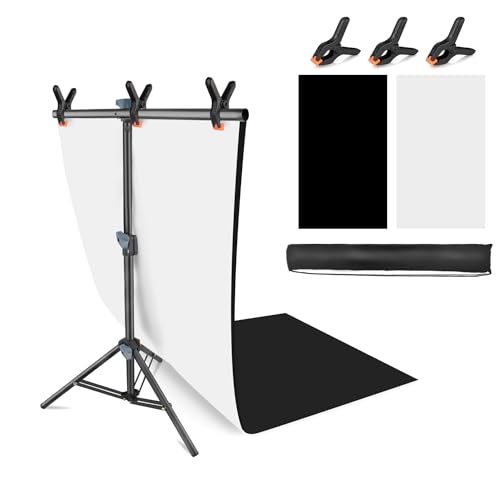
JEBUTU Product Photography Photo Backdrops Stand Kit, Photo Background, 26.8x50in White Black Backdrop Background with 26x29in Small T-Shape Backdrop Stand Tabletop Photo Shoot for Jewelry Cosmetics
Best for consistent e-commerce shots
$25.98
Check price on Amazon
PROLEE 12Inch/360lbs Capacity Electric Motorized Turntable, 360 Degree Rotating Display Stand, Remote Rotating Platform,Large Display Turntable for Photography, White
Best for 360-degree product listings
$61.59
Check price on Amazon
Torjim Softbox Photography Lighting Kit | 16" X 16" & 85W LED Studio Light | Soft Diffusion For Even Light | 3000-7500K Adjustable LED Bulbs for Studio Photo Video Recording Live Streaming Portraits
Best for soft, professional-looking product photos
$49.99
Check price on AmazonPrices as of Oct 15, 2026, 4:40 AM UTC. Product prices and availability are accurate as of the date/time indicated and are subject to change. Any price and availability information displayed on Amazon.com at the time of purchase will apply to the purchase of this product.
Image Optimization Tips
Get weekly tips on image formats, compression, and web performance.
No spam, unsubscribe anytime. We respect your privacy.