Why Won't My Photo Upload? Nine Causes and the Fix for Each
The form keeps rejecting your picture and the error message tells you nothing useful. Work down this list — one of these nine is almost certainly it.
1. The format is HEIC (by far the most common)
iPhones save photos as HEIC by default. Most job portals, visa applications, insurance claim forms, school systems and older shopping carts have never supported it. Convert with HEIC to JPG and try again. To stop it happening at all, switch Settings → Camera → Formats → Most Compatible, explained in HEIC to JPG iPhone settings.
2. The format is WEBP
Any picture you saved from a website is probably .webp. Upload forms reject it routinely. Use the WEBP to JPG converter, or WEBP to PNG if you need transparency.
3. The file is too large
Modern phones produce 4–12 MB photos, and plenty of forms cap uploads at 2 MB, 1 MB or even 200 KB. Rather than guessing, hit the exact number with the compress to an exact KB size tool.
4. The pixel dimensions are too big
Separate from file size, some systems reject anything over, say, 4000 px wide. Scale it down with the image resizer — 1500–2000 px is plenty for almost any form.
5. Wrong dimensions or aspect ratio required
Passport and ID photos, marketplace listings and profile pictures often demand an exact size or a square crop. Use the image cropper, and for ID photos read the passport photo format guide.
6. The extension does not match the contents
Renaming photo.webp to photo.jpg does not convert anything — it just lies about the contents, and strict servers detect it and refuse. Run the file through a real converter, which reads the actual data.
7. The image is CMYK or an unusual colour profile
Files exported for print are often CMYK, which many web uploaders cannot read. Re-saving through any converter here outputs standard sRGB. Background in sRGB vs Adobe RGB.
8. It is a raw camera file
.CR2, .NEF, .ARW and .DNG are camera negatives, not pictures anything can read. Export a JPG from your camera software or phone gallery first.
9. It is not the file at all
- A browser extension or ad blocker is interfering — try an incognito window.
- The upload stalls on a weak connection; switch to Wi-Fi.
- The site's own uploader is broken — try a different browser before blaming your photo.
- Permissions: on iPhone, the browser may only have access to "Selected Photos". Grant full access in Settings → Privacy → Photos.
The universal safe file
When you have no idea what the form wants, give it a JPG, under 1 MB, no more than 2000 px on the long edge, in sRGB. That combination is accepted essentially everywhere. Two tools get you there: a converter then the size compressor.
Still seeing a specific error? "File type not supported" and unsupported file type on Google Drive go deeper on those exact messages.
Not sure which of the nine it is? The image file type checker reads the file the way the website does and reports the real format, extension mismatch, size and CMYK in one go.
Frequently Asked Questions
Why won't my photos upload?
In order of likelihood: the photo is an iPhone HEIC or a WebP the site does not accept; it is over the size limit; its pixel dimensions are too large; or the extension does not match what is inside the file. Convert it to JPG, keep it under 1 MB and 2000 px on the long side, and it goes through almost everywhere.
How do I find out what type of file my photo is?
Do not trust the extension. Drop the file into an image file type checker, which reads the signature in the first bytes of the file — the same check the website makes — and tells you the real format, colour mode and size.
Why does my photo upload fail on my phone but not my computer?
Phones hand websites the original HEIC from the camera roll, while a computer usually has a JPG copy. On iPhone, set Settings > Camera > Formats > Most Compatible, or convert the photo to JPG before uploading.
Does resolution stop a photo uploading?
It can. Some forms reject images above a maximum pixel size, such as 4096 px, or below a minimum, such as 600 px for ID photos. Resize to the stated limits and try again.
Gear we recommend for this workflow
As an Amazon Associate we earn from qualifying purchases. Affiliate disclosure.

Acer USB C Hub, 5-in-1 USBC to HDMI Adapter with 4K@60Hz for Laptop/Mac | USBC Splitter Docking Station with HDMI 2.0, 100W PD, USB-C, USB-A 3.0 & USB-A 2.0 Data Ports for iPad Pro, iPhone 17 Pro Max
$15.97
Check price on Amazon
Samsung T7 Shield Portable SSD 1TB, USB 3.2 Gen 2, Up to 1,050 MB/s | Rugged, IP65 Water Resistant, External Solid State Drive for Photographers, Content Creators and Gaming (MU-PE1T0S/AM), Black
Best for photographers backing up thousands of RAW files
$267.00
Check price on Amazon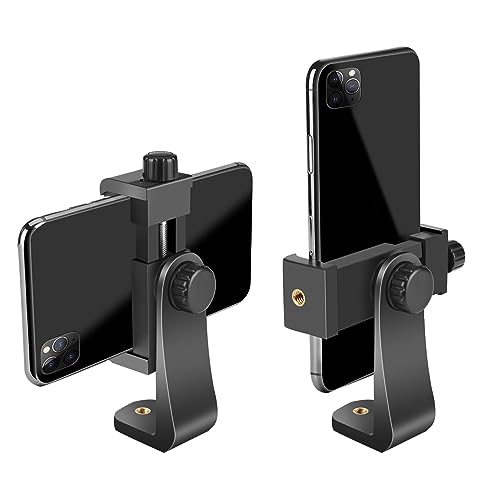
Smartphone Holder/Vertical and Horizontal Tripod Mount Adapter | Premium Rotatable Bracket, 1/4 in Screw, Adjustable Clip for iPhone, Android Cell Phone, Selfie Stick, Camera Stand
Best universal mount for phone tripods
$6.99
Check price on Amazon
Anker Laptop Docking Station Dual Monitor, 8-in-1 USB C Hub with 4K HDMI | Dual HDMI USB C Dock, 1Gbps Ethernet, 85W Max PD, SD/TF Card Reader, for USB C Laptops, XPS and More (Charger Not Included)
$39.99
Check price on AmazonPrices as of Oct 22, 2026, 4:41 AM UTC. Product prices and availability are accurate as of the date/time indicated and are subject to change. Any price and availability information displayed on Amazon.com at the time of purchase will apply to the purchase of this product.
Image Optimization Tips
Get weekly tips on image formats, compression, and web performance.
No spam, unsubscribe anytime. We respect your privacy.