RAW to JPG: How to Convert Camera Files
You copied photos off a camera and got a folder of .CR2, .NEF or .ARW files that nothing will open. They are not broken and they are not really image files — which is exactly why the usual tricks fail.
Updated September 2026
The short answer: A RAW file is unprocessed sensor data in a manufacturer-specific container, not a finished picture, so browsers cannot decode it and neither can most general-purpose software. Use the free converter your camera maker ships, the RAW support built into Windows and macOS, or Adobe's free DNG Converter. Whatever you use has to interpret the data before a JPG exists at all.
A RAW file is not an image yet
When a camera writes a JPG it has already made a series of decisions for you: white balance, contrast curve, sharpening, noise reduction, colour profile, and finally lossy compression. A RAW file skips all of that. It stores what each photosite on the sensor measured, usually 12 or 14 bits per channel, along with the settings the camera would have applied if you had asked for a JPG.
That is the whole point — every one of those decisions stays yours, and you have far more latitude to recover a blown sky or lift a dark subject. It is also why nothing can simply display the file. Something has to demosaic the sensor data, apply a colour profile and render an image before there is a picture to look at.
Why an in-browser converter cannot do it
Browser-based tools work by handing the file to the browser's own image decoder, which supports the formats the web uses: JPEG, PNG, GIF, WEBP, AVIF, BMP, SVG and, increasingly, HEIC. RAW is not one format but dozens of proprietary ones — Canon CR2 and CR3, Nikon NEF and NRW, Sony ARW, Fujifilm RAF, Olympus ORF, Panasonic RW2 — each with its own structure, and several of them undocumented.
Supporting them means shipping a decoding library per manufacturer and a colour profile per camera model, updated every time a new body is released. That is what dedicated RAW software does, and it is why the job belongs on your computer rather than in a browser tab.
The routes that actually work, free
- Your camera maker's software. Canon Digital Photo Professional, Nikon NX Studio and Sony Imaging Edge are all free and know their own sensors better than anything else does. Best colour, slowest interface.
- Windows: install the free Raw Image Extension from the Microsoft Store. Photos and File Explorer can then display most RAW files, and Photos can save a copy as JPG.
- macOS: RAW support is built in. Preview opens most files and File, Export saves JPEG. Finder's Convert Image Quick Action handles a batch.
- Adobe DNG Converter, which is free and does not need a Creative Cloud subscription. It converts any RAW to DNG, a documented open format that far more software can read.
- Darktable and RawTherapee, both free and open source, both full RAW editors with batch export.
The shortcut most people miss
A lot of cameras shoot RAW+JPEG. Check the folder for a .JPG with the same filename as each RAW — if the camera was set that way, the JPGs are already there and you do not need to convert anything.
Failing that, every RAW file has a full-size JPEG preview embedded in it, which is what the camera's rear screen displays. Some tools can extract that preview directly, which is instant and needs no rendering. It carries the camera's own processing rather than yours, but for a quick contact sheet it is often all you need.
Settings when you do export
| Setting | Choose | Why |
|---|---|---|
| Quality | 90-95 | RAW holds detail worth keeping; do not throw it away at the last step |
| Colour space | sRGB for web and sharing | Adobe RGB looks flat and desaturated in software that ignores profiles |
| Bit depth | 8-bit, which is all JPG supports | Do your editing on the RAW, not on the JPG |
| Resize | Full size for archives, 2000px for sharing | Resizing later is easy; recovering detail is not |
| Sharpening | A little, applied last | Downscaling softens; a light pass restores the edge |
Keep the RAW files
A JPG exported from a RAW is one interpretation of the data, baked in permanently. The RAW still holds the full dynamic range and the full bit depth, so you can go back in two years with better software and better judgement and get a different, better result. Storage is cheap; the moment is not repeatable.
Frequently asked questions
Why can’t I open my CR2 or NEF file?
Because it is sensor data rather than a finished image. Something has to demosaic it, apply a colour profile and render it before there is a picture. General-purpose software and browsers do not carry the per-manufacturer decoders needed to do that.
What is the fastest free way to convert RAW to JPG?
On a Mac, open the file in Preview and use File, Export — RAW support is built in. On Windows, install the free Raw Image Extension from the Microsoft Store, then use Photos. Both take about a minute and cost nothing.
Is DNG the same as RAW?
DNG is a RAW format, but an open, documented one that Adobe publishes. Converting a proprietary RAW to DNG with the free Adobe DNG Converter makes it readable by far more software and is a sensible archival move, but it is still RAW — it still needs rendering before you get a JPG.
Does converting RAW to JPG lose quality?
It loses latitude rather than visible quality. The JPG is 8-bit and lossy, so the headroom to recover highlights and shadows is gone, and the decisions about white balance and contrast are now permanent. The picture itself looks fine; what you lose is the ability to change your mind.
Can I batch convert a card full of RAW files?
Yes. Finder’s Convert Image Quick Action on macOS handles a whole selection. On Windows, Photos can export several at once, and Darktable or RawTherapee both have proper batch export queues. Adobe DNG Converter also processes whole folders.
Should I shoot RAW or JPEG?
RAW if you intend to edit, if the light is difficult, or if the shot is not repeatable. JPEG if you need the files immediately, if you are shooting thousands of frames, or if the camera’s own processing already gives you what you want. RAW+JPEG gives you both at the cost of card space.
Keep reading
- Prepare images for printing
- sRGB vs Adobe RGB vs Display P3
- Bulk rename and convert for photographers
- TIFF to JPG converter
- Image resizer
- Scanning old film? Turn negatives into JPGs
Gear we recommend for this workflow
As an Amazon Associate we earn from qualifying purchases. Affiliate disclosure.

Canon EOS Rebel T7 DSLR Camera EF-S 18-55mm f/3.5-5.6 is II Lens Kit | 24.1 Megapixel CMOS (APS-C) Sensor, Full HD Videos, Built-in Wi-Fi, Beginner Photographers, Digital Camera
Best DSLR for learning photography
$499.00
Check price on Amazon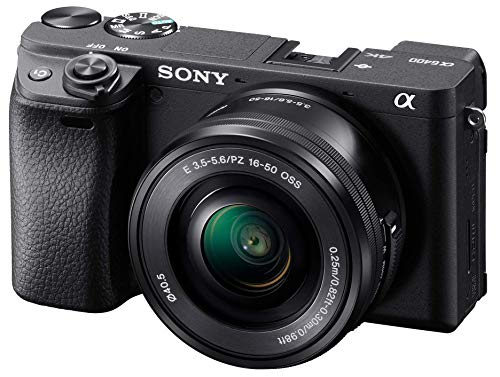
Sony Alpha a6400 Mirrorless Camera: Compact APS-C Interchangeable Lens Digital Camera with Real-Time Eye Auto Focus, 4K Video, Flip Screen & 16-50mm Lens - E Mount Compatible - ILCE-6400L/B, Black
Best mirrorless camera for creators
$806.04
Check price on Amazon
Sony CEA-G Series CFexpress Type A Memory Card CEA-G240T
Best for high-speed 4K/8K video and burst shooting
$263.86
Check price on Amazon
Samsung T7 Shield Portable SSD 1TB, USB 3.2 Gen 2, Up to 1,050 MB/s | Rugged, IP65 Water Resistant, External Solid State Drive for Photographers, Content Creators and Gaming (MU-PE1T0S/AM), Black
Best for photographers backing up thousands of RAW files
$267.00
Check price on AmazonPrices as of Oct 26, 2026, 4:45 AM UTC. Product prices and availability are accurate as of the date/time indicated and are subject to change. Any price and availability information displayed on Amazon.com at the time of purchase will apply to the purchase of this product.
Image Optimization Tips
Get weekly tips on image formats, compression, and web performance.
No spam, unsubscribe anytime. We respect your privacy.